

Channels with Auto-Plugs
Other networks have no Automations section. Auto Repost Posts reposts the post from the same account; on a LinkedIn Page, the page reshares it. Auto plug post publishes your text as a reply under the post, or as a comment on a LinkedIn Page.
Set up a plug
1
Open the channel
In Channels, pick a channel from the table above. Automations has one row per action, marked Active or Off.
2
Open the plug
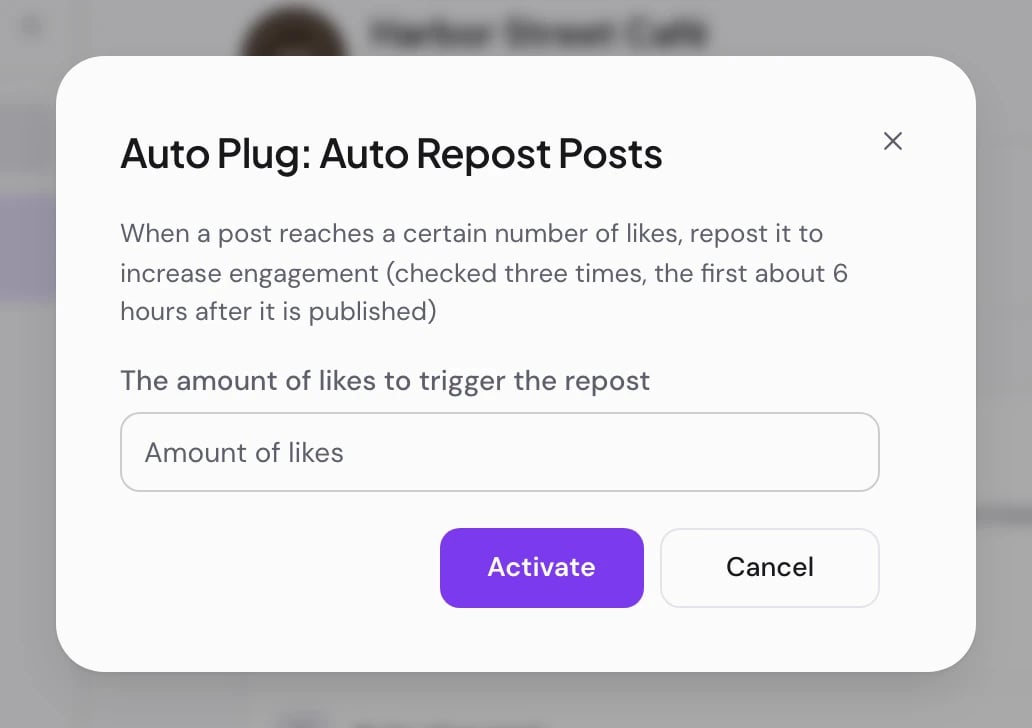
Choose Set up plug on the row of the action you want. A window titled with the action’s name opens.
3
Fill in the fields
The amount of likes to trigger the repost takes a whole number. Auto plug post also asks for Message content to plug: the text of your follow-up, at least three characters.
4
Turn it on
Choose Activate. “Plug updated” confirms it. The plug is on, and every post this channel publishes from now on is watched.
What happens after a post goes out
PostQueen reads the post’s like count up to three times: about 6, 18 and 36 hours after it publishes.- The first check that finds enough likes runs the action once. The checks left for that post are dropped.
- If no check finds enough likes, nothing happens, and the post is not checked again.
- The post itself still goes out at the time you scheduled. A plug only acts afterward.
Turn a plug off or change it
- The toggle on a row switches a plug off or back on and keeps its fields. Switching it off affects posts published after that; a post that is already being watched keeps its remaining checks.
- Edit in the channel’s Automations section reopens the window. On the Auto-Plugs page the button reads Edit plug while the plug is on.
- Activate saves new values but does not switch a plug back on. Use the toggle for that.
Good to know
- A plug belongs to the channel, not to one post. Posts published before you set it up are not checked.
- A channel that shows Needs reconnecting cannot run its plugs. Reconnect it on the Channels page.
- For X, the post composer also offers Add Re-posters in the channel’s settings: other X channels you connected repost the post. See Create a post.
If something goes wrong
Next steps
Connect a channel
Add Bluesky or another network that has Auto-Plugs.

Bluesky
What PostQueen posts to Bluesky and how to connect it.
Analytics
See how many likes your posts usually reach.
Create a post
Write the post an Auto-Plug will watch.