

Before you start
PostQueen asks for the five scopes when a channel connects, and refuses the connect if Pinterest grants fewer.
Create the app
1
Use a business account
Sign in to Pinterest with a business account, or create one: Pinterest says this is the account that administers the app. Verify its email address.
2
Request the app
Open My apps and accept the Developer Terms. Choose Connect app, fill in the request form and submit it. Pinterest reviews requests each business day and emails you the decision. An approved app starts on Trial access.
3
Add the redirect URI
In My apps, choose Manage on the app, open the Configure tab and find Redirect URIs. Enter the address and choose Add:Pinterest accepts 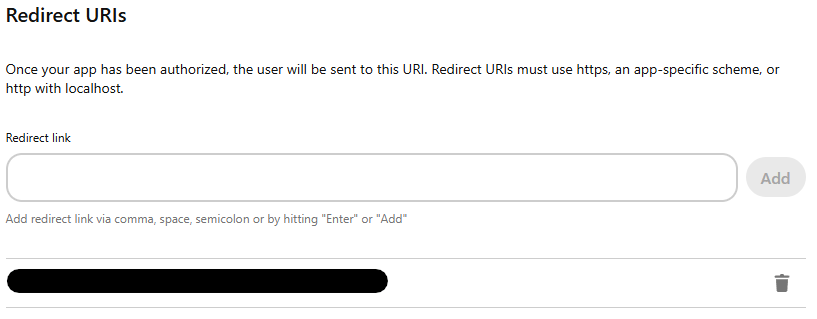
https addresses, and plain http only for localhost. The address has to match exactly.FRONTEND_URL + /integrations/social/ + the network’s identifier, for example
https://postqueen.example.com/integrations/social/pinterest.Most networks need exactly one URI, with no trailing slash. Two exceptions: TikTok Business needs
the trailing slash (/integrations/social/tiktok-business/), and a Google web client that also
serves Google Business Profile lists both /integrations/social/youtube and
/integrations/social/gmb. Channel developer apps lists every
network’s ending.4
Copy the app id and secret
The app page shows the App id and the App secret key. Copy both, and keep the secret private.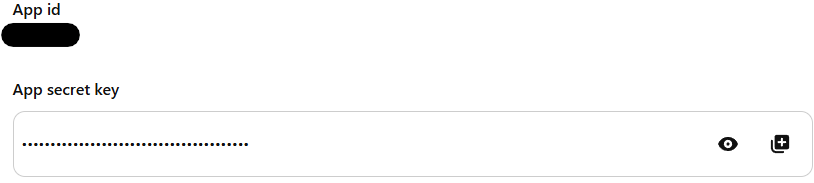
Set the variables
Add the two keys to your environment:docker restart or
docker compose restart keeps the old container and its old environment.
In the folder that holds docker-compose.yaml, recreate only the postqueen service:
docker compose down for a settings change: on
a host that runs other Compose services in the same project, it stops them too.
Then open PostQueen, go to Channels, choose Add Channel and pick this network. You are
sent to its login to authorize PostQueen, and the channel appears in the Channels list once you
accept.
The channel is in the Channels list with its avatar and name.
Add Channel does not check whether your variables are set. A missing or misspelled key shows
up as a broken authorization page on the network’s side rather than a helpful message in
PostQueen, so if the login page itself looks wrong, check the keys before anything else.
App review
1
Trial access
A new app can create boards and Pins, but Pinterest treats them as sandbox content that only their creator can see. Writes are capped at 300 a day for the whole app, and all requests at 1,000 a day.
2
Standard access
For Pins other people can see, choose Upgrade on the app card in My apps. Confirm the use case and your privacy policy link, and upload a video of the app at work that shows the sign-in: a screen recording of a channel connecting in PostQueen and a Pin being scheduled is enough, even if you are the only user. Pinterest often refuses an upgrade when the privacy policy cannot be reached or the video does not show the sign-in.
Troubleshooting
Not enough scopes, when choosing a provider, please add all the scopes
Not enough scopes, when choosing a provider, please add all the scopes
Pinterest returned a token without all five scopes. Connect again and approve every permission on Pinterest’s screen.
Pinterest says the redirect URI does not match
Pinterest says the redirect URI does not match
The address PostQueen sent is not in Redirect URIs. It is exactly your
FRONTEND_URL followed by /integrations/social/pinterest. Check the scheme, the port and that there is no trailing slash.Apps with Trial access may not create Pins in production
Apps with Trial access may not create Pins in production
Pinterest refuses Pins from an app that is still on Trial access. Request Standard access as described in App review.
No boards found, you have to create a board first
No boards found, you have to create a board first
The Pinterest account has no boards yet. Create one on Pinterest, then open the post again.