

Before you start
PostQueen checks every permission it asks for when a Page connects. A missing one stops the connect.
Create the app
1
Start a new app
Open Create an app in Meta for Developers. Enter the app name and a contact email, then choose Next.
2
Choose Other, not a use case
On the use case step, do not pick any of the listed use cases. Scroll to Looking for something else?, select Other and choose Next.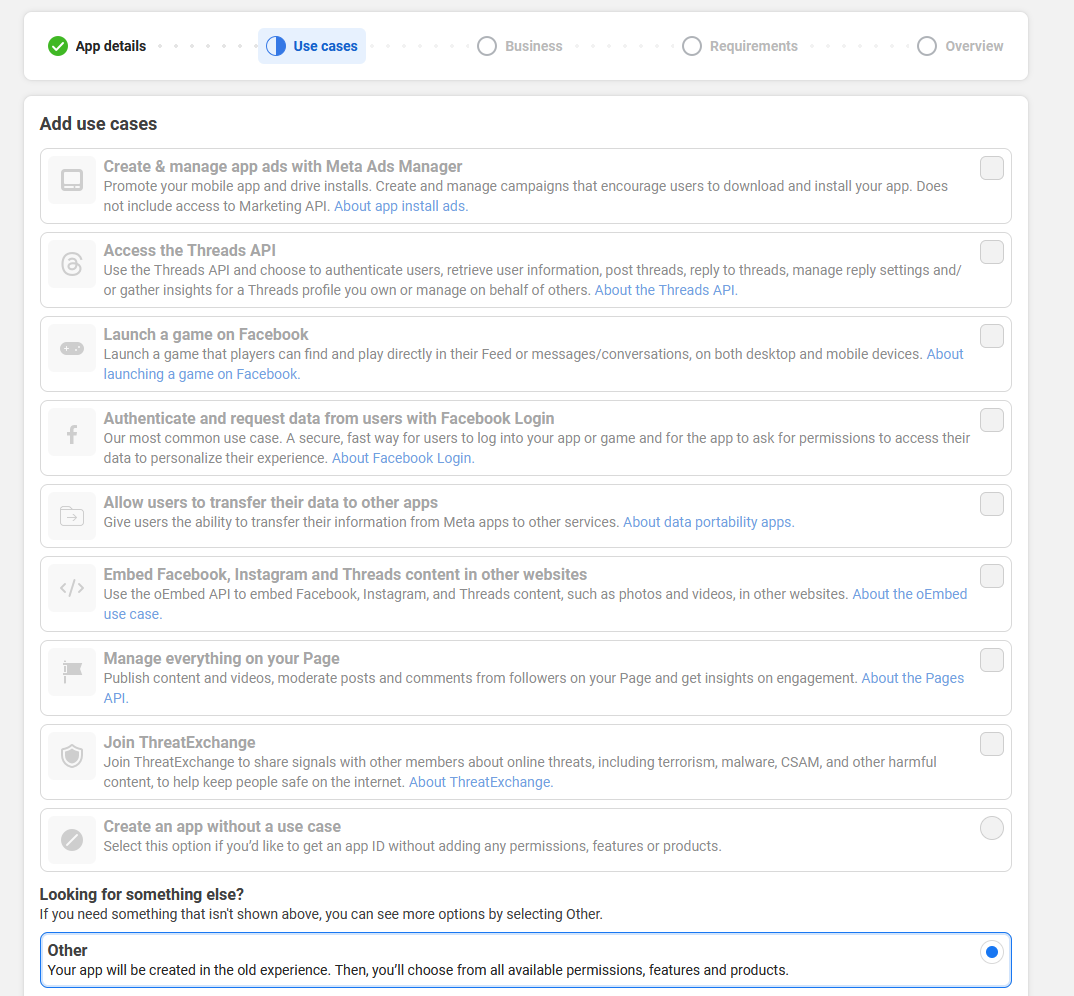
3
Pick the Business type
Select Business as the app type and choose Next. Connect your business portfolio now or later, then choose Create app.
4
Add Facebook Login for Business
In the app dashboard, choose Add Product, find Facebook Login for Business and choose Set up.
5
Add the redirect URIs
Open Facebook Login for Business > Settings. Under Client OAuth settings, add the redirect URIs to Valid OAuth Redirect URIs and save.The redirect URI is where the network sends the browser back after someone approves PostQueen. It is
your Both tiles send
FRONTEND_URL + /integrations/social/ + the network’s identifier, for example
https://postqueen.example.com/integrations/social/pinterest.Most networks need exactly one URI, with no trailing slash. Two exceptions: TikTok Business needs
the trailing slash (/integrations/social/tiktok-business/), and a Google web client that also
serves Google Business Profile lists both /integrations/social/youtube and
/integrations/social/gmb. Channel developer apps lists every
network’s ending.FRONTEND_URL as it is, so the URIs stay plain, http included. Add the /instagram line only if you connect Instagram (Facebook Business).6
Check the permissions
Open App Review > Permissions and Features and check that these are listed:
- Facebook Page:
pages_show_list,business_management,pages_manage_posts,pages_manage_engagement,pages_read_engagement,pages_read_user_contentandread_insights. - Instagram (Facebook Business) adds
instagram_basic,instagram_content_publish,instagram_manage_commentsandinstagram_manage_insights.
instagram_business_*) or Threads permissions (threads_*) to this app: they belong to separate apps. Do not request messaging, ads or pages_manage_metadata permissions either: PostQueen does not use them.PostQueen uses
pages_manage_engagement to publish follow-up comments under Page posts. App Review accepts it only together with pages_read_user_content, so request both in the same submission. PostQueen does not read other people’s comments or posts.7
Set the callback URLs
When someone removes your app on Facebook, or asks for their data to be deleted, Meta calls your server. PostQueen answers both calls: removing the app flags that person’s channels for reconnection, and a deletion request deletes their channels and those channels’ posts.
- In App settings > Basic, under User data deletion, choose the data deletion callback URL and enter
NEXT_PUBLIC_BACKEND_URL+/integrations/facebook/platform-deletion. - In Facebook Login for Business > Settings, set Deauthorize callback URL to
NEXT_PUBLIC_BACKEND_URL+/integrations/facebook/platform-deauthorize.
https://postqueen.example.com/api, the first is https://postqueen.example.com/api/integrations/facebook/platform-deletion. One pair of URLs covers both tiles on this app. Meta only calls a public https address, so skip this step on a local install.8
Copy the App ID and App secret
Open App settings > Basic and copy the App ID and the App secret (choose Show).
Set the variables
Add the two keys to your environment:docker restart or
docker compose restart keeps the old container and its old environment.
In the folder that holds docker-compose.yaml, recreate only the postqueen service:
docker compose down for a settings change: on
a host that runs other Compose services in the same project, it stops them too.
Then open PostQueen, go to Channels, choose Add Channel and pick this network. You are
sent to its login to authorize PostQueen, and the channel appears in the Channels list once you
accept.
The channel is in the Channels list with its avatar and name.
Add Channel does not check whether your variables are set. A missing or misspelled key shows
up as a broken authorization page on the network’s side rather than a helpful message in
PostQueen, so if the login page itself looks wrong, check the keys before anything else.
App review
A new app starts in Development mode:- Only people with a role on the app (administrator, developer or tester) can connect their Pages. Add people under App roles > Roles.
- Posts the app publishes are visible only to people with a role on the app until you switch it to Live. Everyone else sees nothing, or sees a post without its image.
Troubleshooting
Invalid Scopes on Facebook's consent screen
Invalid Scopes on Facebook's consent screen
The app was created through a use case. Create a new app through Other, as in step 2, and move the keys over.
URL Blocked on Facebook's login screen
URL Blocked on Facebook's login screen
The redirect URI PostQueen sent is not in Valid OAuth Redirect URIs. Add it exactly as in step 5, with the scheme and port your
FRONTEND_URL uses.Not enough scopes, when choosing a provider, please add all the scopes
Not enough scopes, when choosing a provider, please add all the scopes
A permission was declined on the consent screen, or is missing from the app. Check the list in step 6, then connect again and approve everything.
Posts show for you but not for anyone else
Posts show for you but not for anyone else
The app is still in Development mode. Switch App Mode to Live.
Related
- Instagram setup: the Instagram (Facebook Business) tile uses this app; Instagram (Standalone) needs its own.
- Channel developer apps
- Configuration reference
- Self-hosting troubleshooting
- Facebook posting settings