

Before you start
Both tiles request the same seven scopes, and PostQueen refuses the connect if LinkedIn grants fewer:
The personal LinkedIn tile needs the organization scopes as well, so the Advertising API is required even if you never connect a company page.
Create the app
1
Create the app
In the developer portal, open My apps and choose Create app. Fill in App name, LinkedIn Page (your organization’s page name or URL), Privacy policy URL and App logo, accept the legal agreement and choose Create app.An app stays tied to the LinkedIn Page you pick here. LinkedIn cannot move it to another page later.
2
Verify the app with your LinkedIn Page
Open the app’s Settings tab and choose Verify. Choose Generate URL, then Copy URL, and send the link to a super admin of the page. They approve the request from that link within 30 days. Choose I’m done to close the dialog.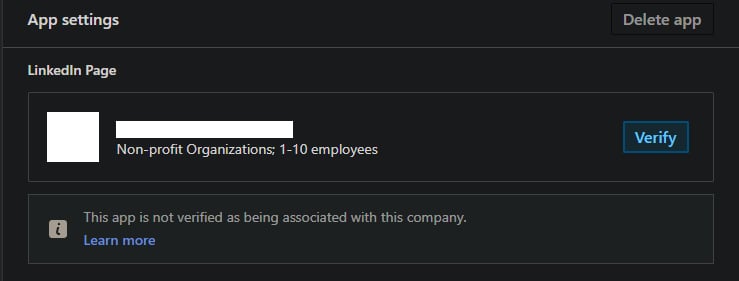
3
Add the three products
Open the Products tab:
- Add Share on LinkedIn and Sign In with LinkedIn using OpenID Connect. Both are added as soon as you accept their terms.
- Choose Request access on Advertising API and complete the access form. LinkedIn reviews the request and tells you the decision by email.
4
Check the scopes
Open the Auth tab. Once all three products are on the app, the OAuth 2.0 scopes list shows all seven scopes from the table above.
5
Add both redirect URLs
On the Auth tab, add both addresses under Authorized redirect URLs for your app:LinkedIn ignores query parameters when it compares the address, so a reconnect that adds one still matches.The redirect URI is where the network sends the browser back after someone approves PostQueen. It is
your
FRONTEND_URL + /integrations/social/ + the network’s identifier, for example
https://postqueen.example.com/integrations/social/pinterest.Most networks need exactly one URI, with no trailing slash. Two exceptions: TikTok Business needs
the trailing slash (/integrations/social/tiktok-business/), and a Google web client that also
serves Google Business Profile lists both /integrations/social/youtube and
/integrations/social/gmb. Channel developer apps lists every
network’s ending.6
Copy the client ID and secret
The Auth tab also shows the app’s Client ID and its client secret. Copy both, and keep the secret private.
Set the variables
Add the two keys to your environment:docker restart or
docker compose restart keeps the old container and its old environment.
In the folder that holds docker-compose.yaml, recreate only the postqueen service:
docker compose down for a settings change: on
a host that runs other Compose services in the same project, it stops them too.
Then open PostQueen, go to Channels, choose Add Channel and pick this network. You are
sent to its login to authorize PostQueen, and the channel appears in the Channels list once you
accept.
The channel is in the Channels list with its avatar and name.
Add Channel does not check whether your variables are set. A missing or misspelled key shows
up as a broken authorization page on the network’s side rather than a helpful message in
PostQueen, so if the login page itself looks wrong, check the keys before anything else.
App review
- Advertising API. Until LinkedIn approves the request, the app does not have the four organization scopes. Every connect, on both tiles, fails until then.
- Staying connected. LinkedIn issues refresh tokens only to apps approved for its marketing products. An access token lasts 60 days and a refresh token 365 days. PostQueen renews the access token by itself; once the refresh token expires, the account has to be reconnected.
- Community Management API. It grants the same organization scopes, but LinkedIn lets you request it only on a new app that has no other products, and it starts on a Development tier limited to 500 calls per app a day. The Advertising API is the simpler route for PostQueen.
Troubleshooting
Not enough scopes, when choosing a provider, please add all the scopes
Not enough scopes, when choosing a provider, please add all the scopes
LinkedIn returned a token without all seven scopes. Open the app’s Auth tab and check the OAuth 2.0 scopes list. A missing organization scope means the Advertising API is not approved yet.
LinkedIn shows an invalid scope error before its consent screen
LinkedIn shows an invalid scope error before its consent screen
PostQueen asked for a scope your app does not have yet. Add the missing product, or wait for the Advertising API approval, then connect again.
LinkedIn says the redirect_uri does not match
LinkedIn says the redirect_uri does not match
The address PostQueen sent is not in Authorized redirect URLs for your app. It is exactly your
FRONTEND_URL followed by /integrations/social/linkedin or /integrations/social/linkedin-page. Check the scheme, the port and that there is no trailing slash.The company page is not in the list
The company page is not in the list
LinkedIn Page lists only pages where your LinkedIn account is an administrator or content administrator. Ask a super admin of the page to give you one of those roles, then connect again.