

n8n-nodes-postqueen is a community node for n8n. It creates, lists and deletes posts, uploads files, makes AI videos and lists your channels, through the PostQueen API with your API key. Everything it creates lands on the same calendar as the posts you write in the app.
This page describes version 1.0.5 of the node.
Before you start
- An n8n instance you run, where you are the Owner or an Admin. n8n installs community nodes from npm only there. n8n Cloud installs only the community nodes n8n has verified, and this one is not verified yet. On n8n Cloud, call the API with the HTTP Request node instead, as shown in Calls the node does not make.
- A PostQueen workspace on a trial or a paid plan, with at least one connected channel.
- The API key, from the box below.
Where the API key is: in the app, open Connections > API Keys. Only a workspace Admin or Super Admin can reveal or rotate it; other members see it masked. A workspace has one key, and each agent card on Connections shows your MCP address with the key already filled in.
Install the node and add your key
1
Install the community node
In n8n, go to Settings > Community Nodes and select Install. Enter 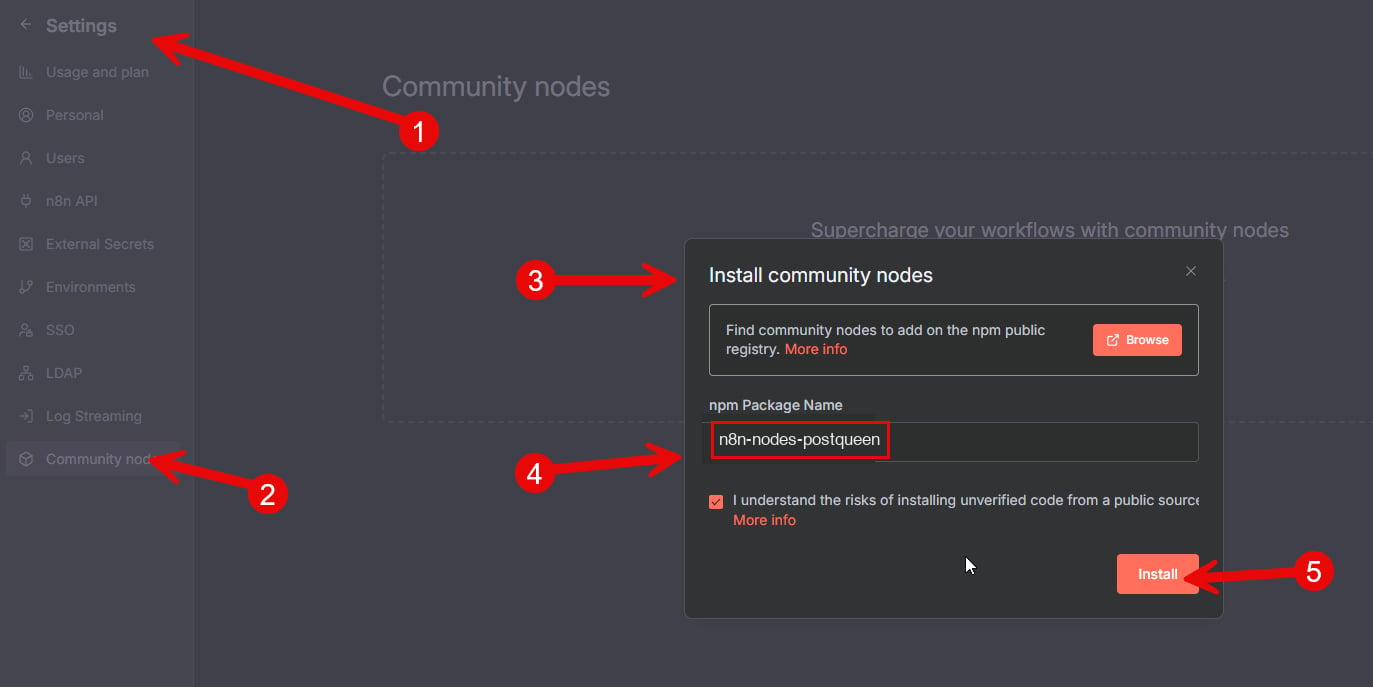
n8n-nodes-postqueen in Enter npm package name, check I understand the risks of installing unverified code from a public source, and select Install.2
Create the credential
Add a PostQueen node to a workflow and create a new PostQueen API credential:
When you save, n8n tests the credential against the API’s key check (
GET /public/v1/is-connected).3
Check it
Set the node’s Operation to Get Channels and execute the node on its own.
Your connected channels come back, one item per channel, each with its
id. That id is the Channel ID every post needs.Operations
There is no PostQueen trigger node. A workflow starts from an n8n trigger, such as a Schedule Trigger, an RSS Feed Trigger or a webhook. To start a workflow when PostQueen publishes a post, point a PostQueen webhook at an n8n Webhook node.
Create Post fields
Inside each Post:
Leave a content item’s ID empty to create a new post. The ID of an existing post changes that post instead.
A WordPress post, for example, needs two settings:
What each network needs is on Posting settings by network.
Other fields
- Get Posts: Start Date (UTC), End Date (UTC) and an optional Customer id.
- Upload File: Binary Property, the name of the binary field that holds the file. Most nodes that read files call it
data. The node returns the stored file with itsid,pathandstatus. A video comes backprocessing: wait until it isreadybefore you post it (see Get media status). - Generate Video: Video Type is
image-text-slides(the default, narrated slides) orseedance(Seedance 2.0, video with audio). Output Format is Vertical or Horizontal. Under Custom Parameters, add one Parameter per input the video type expects, with its Key and Value:promptandvoiceforimage-text-slides, with a voice ID from Video Function, andpromptandimagesforseedance. Seedance needsimageseven for a video from the prompt alone: set it to[]. A Value that is valid JSON, such as an array, is sent parsed, soimagescan be[]or up to three uploaded files as[{"id": "...", "path": "https://..."}], with a lowercaseid. The node waits while the video is made, which takes minutes, and returns the stored file: itsidandpathgo into Images on Create Post. Each video is paid from your workspace’s credits. The inputs are on Generate a video. - Video Function: set Function Name to
loadVoicesand Identifier toimage-text-slidesto list the voices, each with theidthatvoicetakes. Additional Parameters go to the function underparams, parsed when a value is valid JSON.loadVoicestakes none, so leave them empty. - Delete Post: Post ID. When it works, the node outputs
{ "error": true }: that is the API’s answer to a successful delete. A post that does not exist stops the node with a 404.
Build a workflow: new blog post to Bluesky

1
Watch the feed
Add an RSS Feed Trigger. Set Feed URL to your blog’s feed and Poll Times to Every Hour.
2
Add Create Post
Add a PostQueen node with Operation set to Create Post and Type set to Draft for now. Set Date to an expression, for an hour from the run:
3
Pick the channel and the text
Under Posts, add a Post with your Bluesky Channel ID. Add a Content Item and set Content to an expression:Bluesky takes 300 characters. To have a caption written for you, put an AI node between the trigger and PostQueen and use its output here.
4
Test, then go live
Execute the workflow once and find the draft on your PostQueen calendar. When it looks right, set Type to Schedule and activate the workflow.
Calls the node does not make
For any other endpoint, such as Get media status or analytics, use n8n’s HTTP Request node:- Set Authentication to Generic Credential Type and Generic Auth Type to Header Auth.
- Create a Header Auth credential with Name
Authorizationand Value your API key, as it is, with noBearerprefix. - Set the URL to the endpoint under
https://api.postqueen.ai/public/v1, for example:
If something goes wrong
The credential test fails
The credential test fails
Check that the key is pasted in full and that Host is
https://api.postqueen.ai. A workspace with no plan answers No subscription found.PostQueen is missing from the node list after the install
PostQueen is missing from the node list after the install
Restart n8n, then look again. Installing from npm needs the Owner or an Admin of the instance.
A test run published a post
A test run published a post
Type starts at Now. Choose Draft while you build the workflow.
Create Post is refused with a settings error
Create Post is refused with a settings error
The network needs settings on every post. Add them under Settings on the post. Posting settings by network lists the required ones.
An image is refused with a file extension error
An image is refused with a file extension error
A post takes media whose Path ends in .png, .jpg, .jpeg, .gif, .webp or .mp4. Upload the file with Upload File and use the
path it returns.Source
postqueen-n8n on GitHub
The node’s source and issues.
n8n-nodes-postqueen on npm
Versions of the package.
Next steps
Schedule a post with the API
From listing your channels to checking that the post went out.
Posting settings by network
The settings each network needs in a post, and which fields are required.
Limits and errors
The hourly limits, and the status codes the API returns.
Node.js SDK
Call the API from JavaScript or TypeScript with @postqueen/node.