> ## Documentation Index
> Fetch the complete documentation index at: https://docs.postqueen.ai/llms.txt
> Use this file to discover all available pages before exploring further.
> ## Agent Instructions
> PostQueen's hosted API is https://api.postqueen.ai. The public API base is https://api.postqueen.ai/public/v1 and takes the raw API key in the Authorization header, with no Bearer prefix.
> The MCP server for posting is https://api.postqueen.ai/mcp/YOUR_API_KEY (or /mcp with Authorization: Bearer YOUR_API_KEY). docs.postqueen.ai/mcp only searches these docs and cannot post.
> The API key is under Connections > API Keys in the app, and only workspace admins can see it.
# Comments and threads
> Add a first comment or continue a thread under a post, space the parts out with a delay, and see what each network does with them.
**Where:** the composer, under the post text. Open it with **Create Post** at the top of any page.
A post can carry more parts after it. PostQueen publishes the post first, then each part in order, as a comment or as the next post in a thread, depending on the network.
 ## Add parts to a post
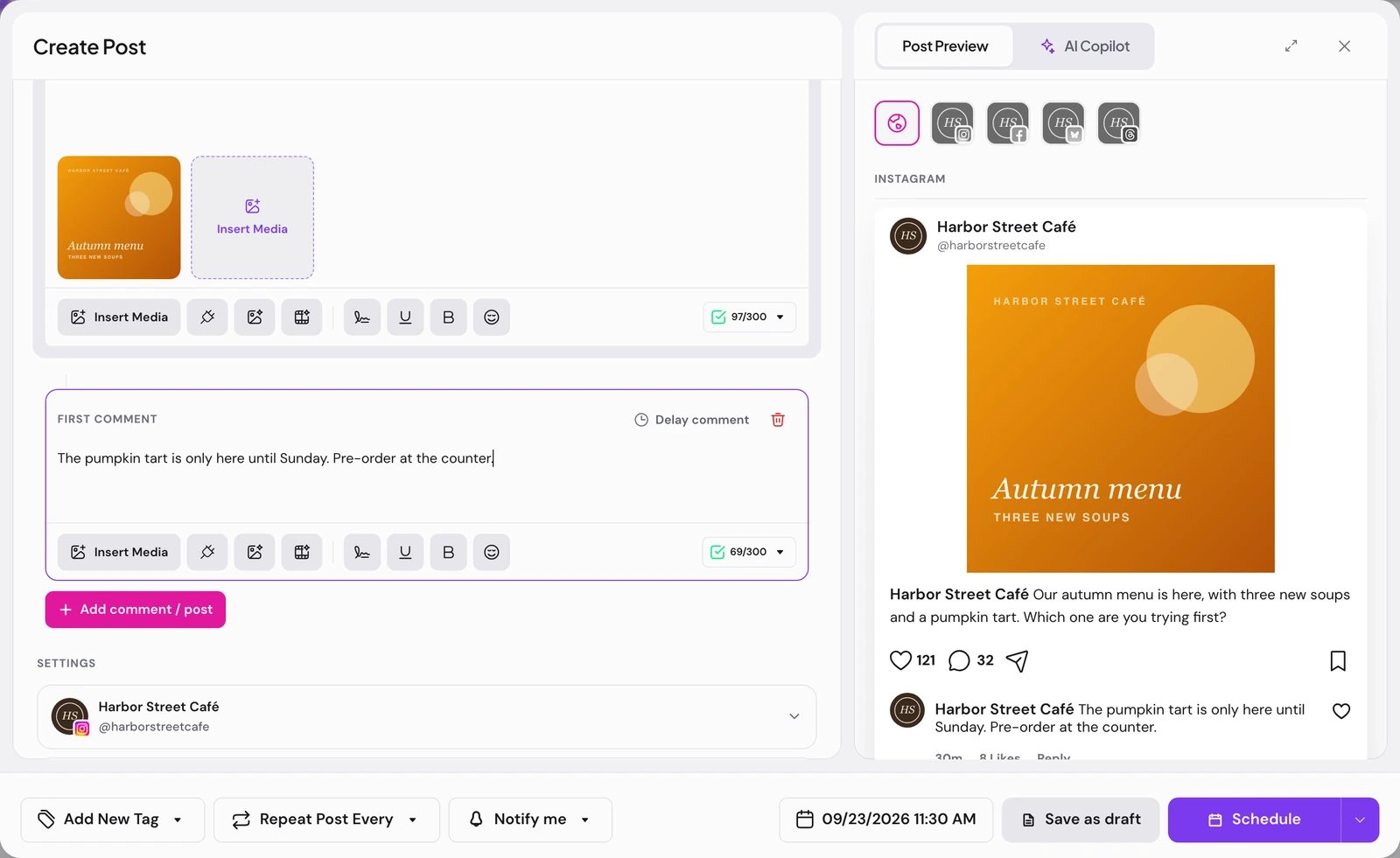
Under the post text, choose **Add comment**. A **First Comment** card opens with its own text box and attachments.
The button under the last card adds the next part. In global mode it reads **Add comment / post**. On a channel's own tab it reads **Continue thread** on networks that chain replies, and **Add comment** on networks that comment under the post. Later cards are headed **Comments**.
Choose **Delay comment** on a card to hold that part back after the one before it: 1m, 2m, 5m, 10m, 15m, 30m, 1h or 2h, or a number of minutes with **Custom min** and **Set**. **Remove delay** publishes it right after the previous part.
Choose **Schedule**. The parts go out after the post, each one after its delay.
**Remove** (the trash icon) on a card deletes that part at once, without asking.
## What each network does with the parts
For networks you can connect today:
| Network | The parts after the post |
| --------------------------------------------------- | ------------------------------------------------------------------------------------------------------------ |
| Bluesky | Replies, each one to the part before, so they read as a thread. |
| Nostr | Reply notes, each one to the part before. |
| Lemmy | Comments on the post, in every community you posted to. Only the text is sent. |
| Moltbook | Comments on the post, each one nested under the part before. |
| X | Replies, each one to the part before. |
| Threads | Replies, each one to the part before. |
| Facebook | The first part comments on the post, and each one after replies to the comment before. One picture per part. |
| Instagram | Comments on the post. Text only: comment cards have no media buttons. |
| WordPress, DEV, Hashnode, Listmonk, TikTok, YouTube | None. Only the post is published. |
X, Threads, Facebook, Instagram, TikTok and YouTube are **In review**, each with the limit its page states. The Soon networks and their comment support are on [Channels and their status](/channels/overview).
## Good to know
* The badge under the editor lists any picked channel that cannot take the parts under **Comments cannot be published on**. On those channels only the post goes out.
* A part needs text or a picture. An empty card shows "Your comment should have at least one character or one image."
* Parts count against each network's character limit like the post does.
* The delay starts when the part before it is published, not when the post was scheduled.
## If something goes wrong
| Message | What to do |
| --------------------------------------------------------------------- | -------------------------------------------------------------------------------------------- |
| “Comments cannot be published on” | Those channels publish the post only. Remove the parts, or keep them for the other channels. |
| A notification that a network "cannot post comments" after publishing | The post went out and the parts after it did not. Nothing else to do. |
| “Your comment should have at least one character or one image.” | Write something in the empty card, or remove it. |
## Next steps
The composer, per-channel versions and the ways to save.
Check the post and its time, then move or preview it.
Connect Bluesky and post threads to it.
Why a post or one of its parts did not go out.
## Add parts to a post
Under the post text, choose **Add comment**. A **First Comment** card opens with its own text box and attachments.
The button under the last card adds the next part. In global mode it reads **Add comment / post**. On a channel's own tab it reads **Continue thread** on networks that chain replies, and **Add comment** on networks that comment under the post. Later cards are headed **Comments**.
Choose **Delay comment** on a card to hold that part back after the one before it: 1m, 2m, 5m, 10m, 15m, 30m, 1h or 2h, or a number of minutes with **Custom min** and **Set**. **Remove delay** publishes it right after the previous part.
Choose **Schedule**. The parts go out after the post, each one after its delay.
**Remove** (the trash icon) on a card deletes that part at once, without asking.
## What each network does with the parts
For networks you can connect today:
| Network | The parts after the post |
| --------------------------------------------------- | ------------------------------------------------------------------------------------------------------------ |
| Bluesky | Replies, each one to the part before, so they read as a thread. |
| Nostr | Reply notes, each one to the part before. |
| Lemmy | Comments on the post, in every community you posted to. Only the text is sent. |
| Moltbook | Comments on the post, each one nested under the part before. |
| X | Replies, each one to the part before. |
| Threads | Replies, each one to the part before. |
| Facebook | The first part comments on the post, and each one after replies to the comment before. One picture per part. |
| Instagram | Comments on the post. Text only: comment cards have no media buttons. |
| WordPress, DEV, Hashnode, Listmonk, TikTok, YouTube | None. Only the post is published. |
X, Threads, Facebook, Instagram, TikTok and YouTube are **In review**, each with the limit its page states. The Soon networks and their comment support are on [Channels and their status](/channels/overview).
## Good to know
* The badge under the editor lists any picked channel that cannot take the parts under **Comments cannot be published on**. On those channels only the post goes out.
* A part needs text or a picture. An empty card shows "Your comment should have at least one character or one image."
* Parts count against each network's character limit like the post does.
* The delay starts when the part before it is published, not when the post was scheduled.
## If something goes wrong
| Message | What to do |
| --------------------------------------------------------------------- | -------------------------------------------------------------------------------------------- |
| “Comments cannot be published on” | Those channels publish the post only. Remove the parts, or keep them for the other channels. |
| A notification that a network "cannot post comments" after publishing | The post went out and the parts after it did not. Nothing else to do. |
| “Your comment should have at least one character or one image.” | Write something in the empty card, or remove it. |
## Next steps
The composer, per-channel versions and the ways to save.
Check the post and its time, then move or preview it.
Connect Bluesky and post threads to it.
Why a post or one of its parts did not go out.