> ## Documentation Index
> Fetch the complete documentation index at: https://docs.postqueen.ai/llms.txt
> Use this file to discover all available pages before exploring further.
# Bluesky
> How to add Bluesky to PostQueen
 ## What she can post to Bluesky
Three hundred characters is the whole canvas here, so she keeps the copy tight and lets the pictures carry the rest. Links and mentions are detected in the text as she posts, so they arrive live rather than as flat strings.
300 characters per post.
One video or up to four images. A post with no attachment is fine too. Images larger than 976 KB are scaled down before upload.
A post, then replies threaded underneath it as comments.
None. Ten connectors report numbers back to her, and Bluesky is not one of them.
| Area | Detail |
| ------------- | ------------------------------------------------------------------------------------------------------------------------------------------------------------------------------------------------------------------------------------------------------------- |
| Post settings | Nothing beyond `__type`. Copy, media and timing are set on the post itself: [Bluesky settings](/public-api/providers/bluesky). |
| Connect flow | One step, inside the app. You give a service URL (`https://bsky.social` by default), your identifier and an app password. |
| Automations | **Auto Repost Posts** reposts a post once it reaches a like count you choose. **Auto plug post** adds a follow-up post to the thread at that same like count. Both run every six hours, up to three times. Auto Repost Posts works on posts up to a week old. |
| Publish rate | Two posts at a time. |
Limits she reports back to you, in her own words:
* **"You can only upload one video per post."**
* **"There can be maximum 4 pictures in a post."**
* **"Video upload timed out, job did not complete"** if Bluesky is still processing after roughly nine minutes.
* **"Invalid service URL: must be a public HTTPS address"** if the service you typed is not a public HTTPS host.
Two-factor authentication is not supported: *"We don’t currently support two-factor authentication. If it’s enabled on Bluesky, you’ll need to disable it."*
## Set up Bluesky
You do not need to configure any environment variables for BlueSky, you can simply add your account from the UI.
## What she can post to Bluesky
Three hundred characters is the whole canvas here, so she keeps the copy tight and lets the pictures carry the rest. Links and mentions are detected in the text as she posts, so they arrive live rather than as flat strings.
300 characters per post.
One video or up to four images. A post with no attachment is fine too. Images larger than 976 KB are scaled down before upload.
A post, then replies threaded underneath it as comments.
None. Ten connectors report numbers back to her, and Bluesky is not one of them.
| Area | Detail |
| ------------- | ------------------------------------------------------------------------------------------------------------------------------------------------------------------------------------------------------------------------------------------------------------- |
| Post settings | Nothing beyond `__type`. Copy, media and timing are set on the post itself: [Bluesky settings](/public-api/providers/bluesky). |
| Connect flow | One step, inside the app. You give a service URL (`https://bsky.social` by default), your identifier and an app password. |
| Automations | **Auto Repost Posts** reposts a post once it reaches a like count you choose. **Auto plug post** adds a follow-up post to the thread at that same like count. Both run every six hours, up to three times. Auto Repost Posts works on posts up to a week old. |
| Publish rate | Two posts at a time. |
Limits she reports back to you, in her own words:
* **"You can only upload one video per post."**
* **"There can be maximum 4 pictures in a post."**
* **"Video upload timed out, job did not complete"** if Bluesky is still processing after roughly nine minutes.
* **"Invalid service URL: must be a public HTTPS address"** if the service you typed is not a public HTTPS host.
Two-factor authentication is not supported: *"We don’t currently support two-factor authentication. If it’s enabled on Bluesky, you’ll need to disable it."*
## Set up Bluesky
You do not need to configure any environment variables for BlueSky, you can simply add your account from the UI.
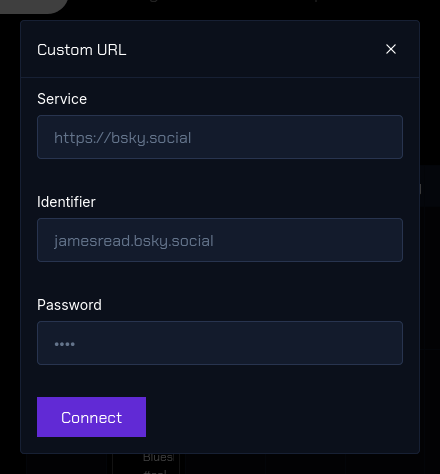 You should be redirected and be able to start posting immediately. If you have any issues, check the backend service logs.
The channel is in the left sidebar with its avatar and name. That is the whole confirmation: if it is in the list, she can post to it.
You should be redirected and be able to start posting immediately. If you have any issues, check the backend service logs.
The channel is in the left sidebar with its avatar and name. That is the whole confirmation: if it is in the list, she can post to it.